
Total Loss ACV Worksheet: What Appraisers Asked For
What three weeks of appraiser feedback changed in our total loss ACV worksheet
The changes to the ACV and Total Loss Valuation Worksheets, why each one exists, and a 2019 Equinox file that shows them working
Every figure below comes from worksheet runs between Aug 31 and Sep 17, 2026. All comparable prices are advertised (asking) prices read off each dealer's own page. Negotiated sale prices are not public, and we do not pretend otherwise. The example worksheet is live, so you can check our work.
Key takeaways for appraisers
- A weak comparable does more damage than no number at all. The worksheet now refuses to auto-select any comp under a 70% match. If nothing qualifies, you get no figure and no charge.
- Strip the fees before you average. In the example below, doc and dealer fees on four comparables ranged from $200 to $1,000. Left in, they inflate ACV and hand the carrier an easy rebuttal.
- Choose how far to look for comps. Anywhere from within 50 miles up to national. National, nearest first, is the default; pick 50, 100, 250, 500 or 1,000 miles when the policy or your state points to a local market.
- Keep the listing, not just the price. Listings sell and vanish. Each selected comp's dealer page is saved with a date, so your evidence outlives the ad.
- Know when the file is not worth fighting. In two of the five files with healthy comp pools, the carrier's offer was at or above the worksheet figure. A good worksheet tells you that too.
On Aug 31 an independent appraiser opened an account and started running total-loss files through our worksheet. Over the next ten days they ran eight. Then they sent us an email with seven questions and six complaints, and followed it with a phone call on Sep 15.
Most of what shipped in the three weeks since came from that email and that call.
What the first eight files taught us
Here are those eight files, stripped of names and claim numbers. "Worksheet" is the figure the worksheet produced at the time, before any of the changes below. These are eight files from one appraiser, run Aug 31 to Sep 10, 2026.
| Vehicle | Carrier offer | Worksheet | Difference | Comp pool |
|---|---|---|---|---|
| 2013 Ford Edge SEL | $5,449 | $4,366 | -$1,083 | 3 of 7, within 50 mi |
| 2013 Subaru XV Crosstrek Premium | $10,220 | $12,006 | +$1,786 | 3 of 9, within 500 mi |
| 2024 Chevrolet Trax RS | $19,289 | $18,876 | -$413 | 3 of 6, within 50 mi |
| 2023 Toyota GR86 Premium | $24,473 | $27,591 | +$3,118 | 3 of 8, within 500 mi |
| 2019 BMW X5 40i | $27,204 | $28,976 | +$1,772 | 3 of 10, within 100 mi |
| 2013 Chrysler 300C | $11,958 | $14,492 | +$2,534 | 3 of 3, nationwide |
| 2016 RAM 2500 Laramie Limited | $26,646 | $32,040 | +$5,394 | 3 of 6, nationwide, one comp at 52% match |
| 2018 Jaguar XJ Supercharged | $31,577 | $25,829 | -$5,748 | 3 of 3, nationwide, comps at 30% match |
The first five had healthy pools, and the worksheet landed above the offer on three of them, by $1,772 to $3,118. On the other two, the offer was $413 and $1,083 above the worksheet.
The last three are the problem. Each one ran out of close comparables, went nationwide, and averaged in whatever it found. The Jaguar was priced off cars with a different engine and 82,000 to 129,000 miles, and the worksheet came out $5,748 under the offer. The "error code 52" our appraiser asked about was a 52% match score on one of the RAM's comparables, sitting in the table with no explanation of what it meant. That was the first thing we fixed.
The worked example: a 2019 Equinox that is hard to comp
To show the current worksheet, we ran a Total Loss Valuation Worksheet on Sep 17 for a 2019 Chevrolet Equinox Premier AWD 2.0T with 25,000 miles, loss ZIP 90044 (Los Angeles). We chose it because it is awkward to comp: the 2.0T Premier is not a common build, and 25,000 miles on a 2019 is low, so a mileage-matched pool is thin. We also entered a $25,000 carrier offer, on purpose, to see what the page does when the offer sits above the evidence.
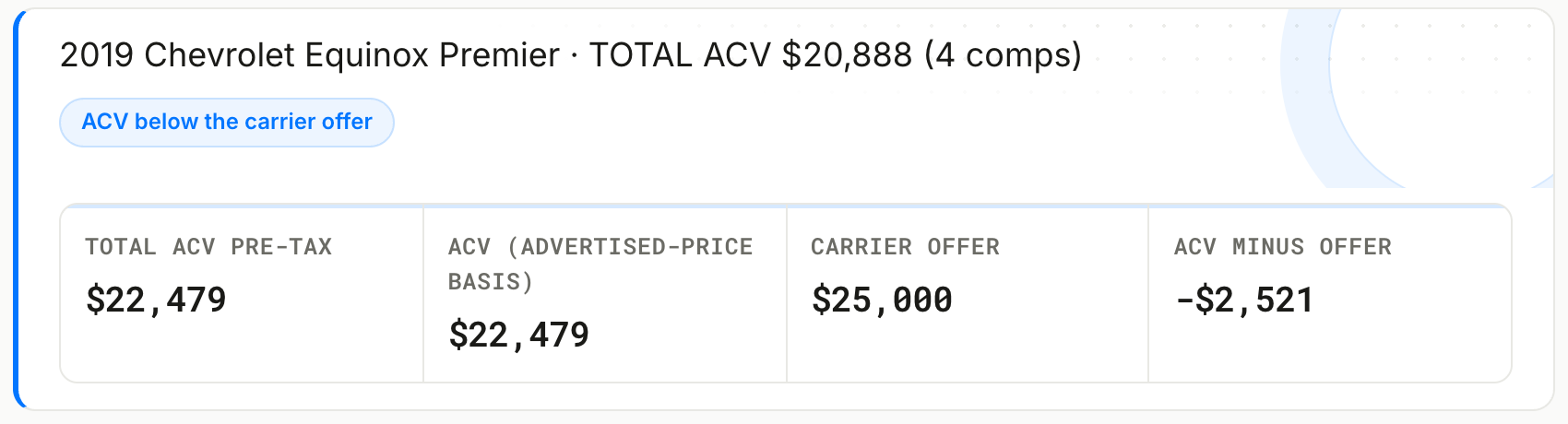
The worksheet's memo reads: "The carrier's offer is at or above the comp-backed ACV; the market data does not support arguing it up."
1. No comparable under a 70% match gets used without you
Every comparable gets a match score out of 100: 40 points for the VIN pattern (characters 4 to 8, which lock the model and engine), 30 for mileage proximity, 15 for drivetrain and 15 for engine. Options similarity from the full decode and distance are scored separately.
Anything under 70% can still sit in the pool where you can see it. The worksheet will not select it for you. If no comparable reaches 70%, the money lines read "not computed", the page offers a re-run at the next radius, and you are not charged.
Under today's rules the Jaguar file above produces no figure.
2. Photos and outliers: every exclusion has a reason on the page
A comparable now needs at least four photos. A listing with one stock image and no pictures of the actual car is not evidence you can put in front of an umpire.
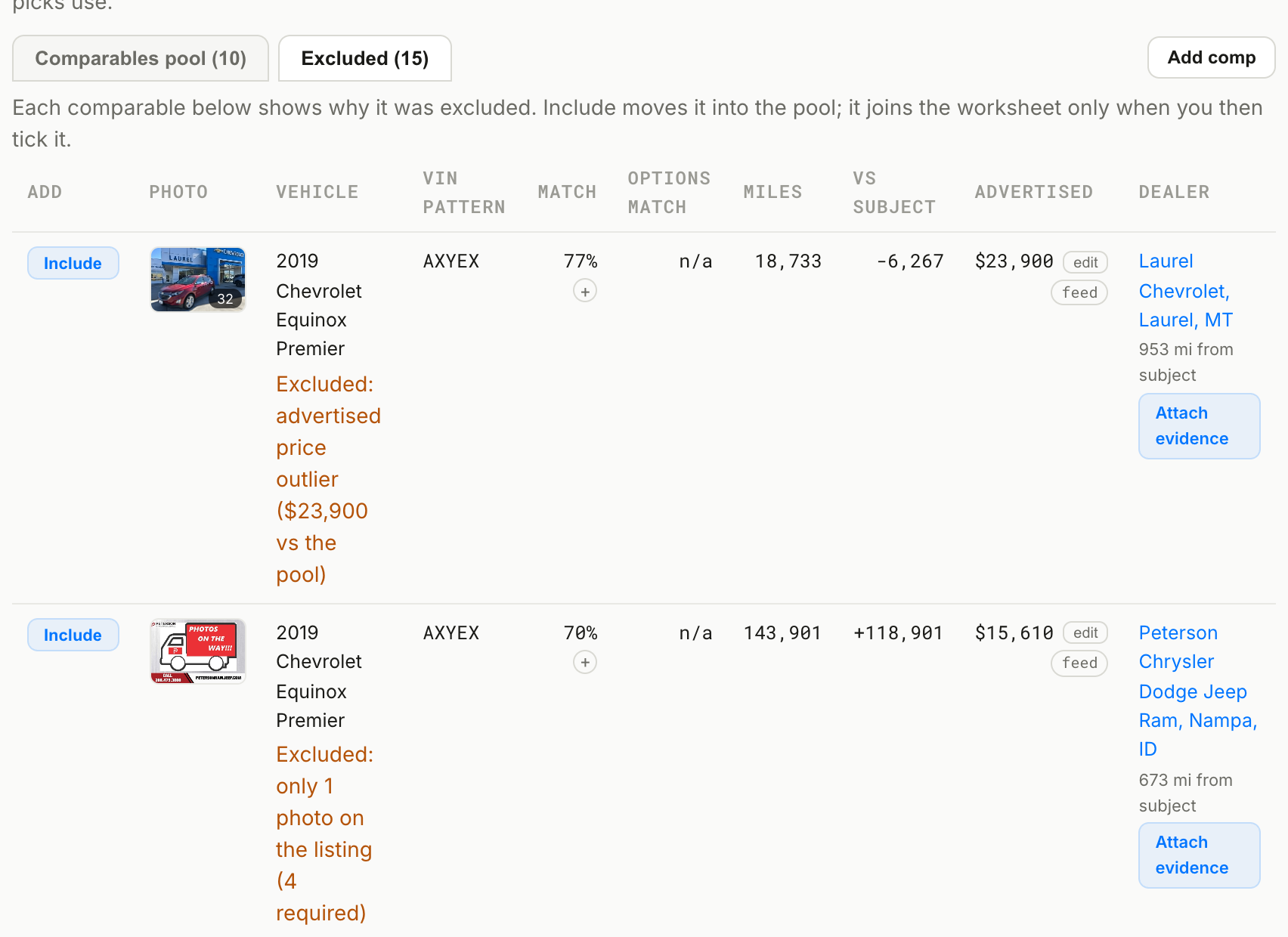
The Equinox search found 25 candidates. Fifteen were excluded, and the Excluded tab shows why for each one:
- 7 had fewer than 4 photos (five with 1, two with 2)
- 2 were advertised-price outliers, at $23,900 and $24,999, against the rest of the pool
- 6 were eligible but ranked below the top 10 on match and distance
3. Where the comps come from: radius and model years
The run form now lets you choose where comparables come from, anywhere from within 50 miles of the loss up to national. The choices are 50, 100, 250, 500 or 1,000 miles, or National, which starts nearest and widens only as far as it needs to. The worksheet states which one you picked, so a reviewer knows it was the preparer's call.
For the Equinox we left it on National. The search started at 25 miles from Los Angeles and widened step by step past 1,000 miles, because this build is scarce, and the page says so.
A new optional field, Comparable model years, widens the search to a range or a list of years, for example 2018 to 2020. Make, model, trim and engine matching do not change. Because more years fill the pool sooner, the search can stop at a tighter radius.
4. Three or four comps, and four positions to compare
Some appraisers file with three comparables, others with four. Worksheet size is now a required choice on the run form, with 3 as the default.
On the hosted page, the Comparable selection panel shows four prices side by side, each built from a different set:
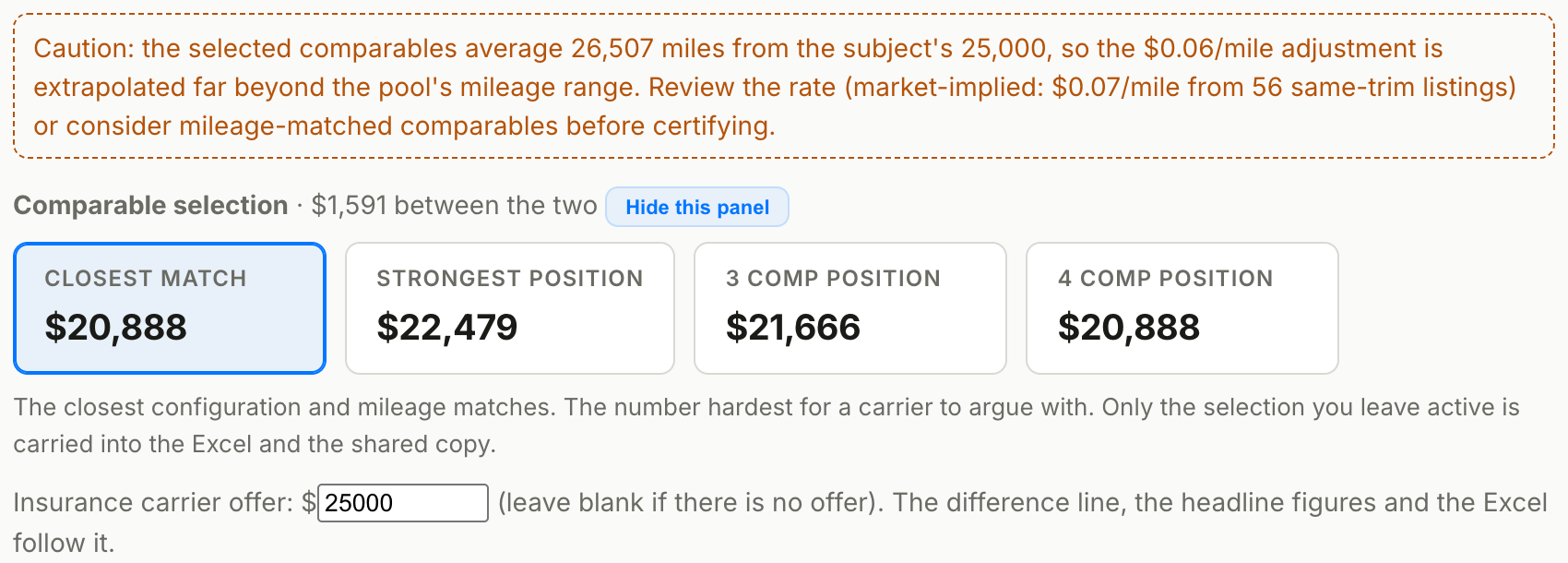
That $1,591 is the room the evidence gives you, and it is worth knowing before you call the adjuster. One click applies a set. Only the set you leave selected goes into the Excel and PDF, and the read-only copy.
If you never use the panel, hide it once. Since Sep 14 that choice carries over to every later worksheet on your account.
5. Prices read off the dealer's page, fees taken out
Listing feeds carry whatever price the dealer syndicated, and that price often differs from the dealer's own page. In the Equinox pool, 63 Auto's feed price was $22,588 against $20,900 on its page, and Bud Clary's was $16,095 against $15,595. The worksheet reads each comparable's own page and takes out documentation and dealer fees before it averages.
From the Equinox pool:
- 63 Auto, Huntsville, TN: $20,900 on the page, of which $1,000 is a doc fee. Worksheet uses $19,900.
- Young Chrysler Dodge Jeep Ram, Burley, ID: "CDJR Idaho Price" $20,498, of which $499 is a doc fee. Worksheet uses $19,999.
- John Elway Chevrolet, Englewood, CO: "Elway Price" $22,477, of which $699 is D&H. Worksheet uses $21,778.
- Scott Volvo Cars Allentown, PA: $21,085 plus a $490 doc fee. Worksheet uses $21,085.
- Bud Clary Ford, Longview, WA: $15,595 plus a $200 doc fee. Worksheet uses $15,595.
Five of six pool comparables were verified on the dealer's own page. One could not be read, and the page marks it "feed" instead of "no-fee verified" so you know which is which.
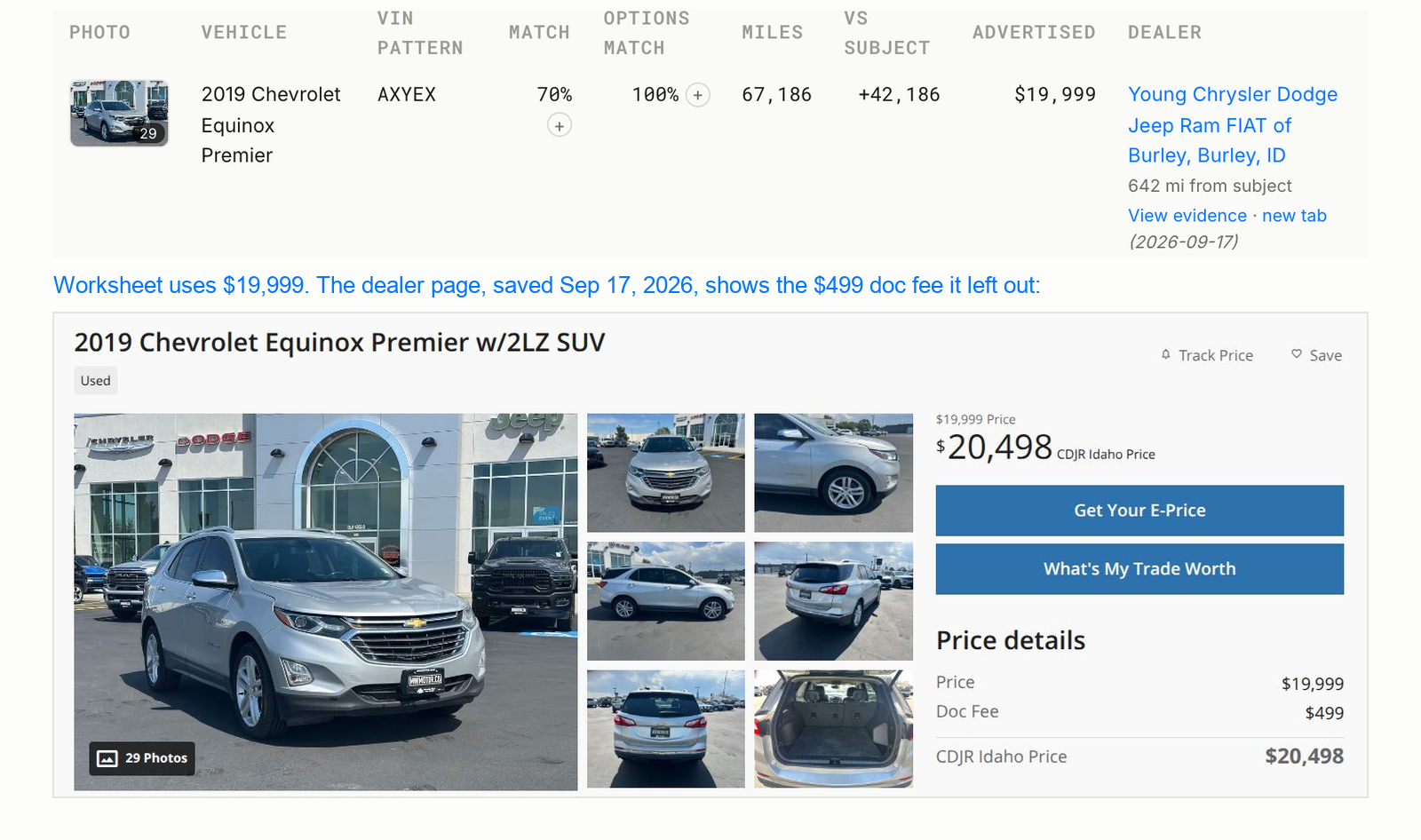
Each selected comparable's full page is saved with its capture date. When the Burley listing sells and comes down, the snapshot is still in your file, attached to the report and included in the PDF.
6. Accident flags on the comparables
When a comparable's dealer page shows a CARFAX or AutoCheck accident, the worksheet puts a red "Accident reported" badge under that vehicle and adds a note in the Excel. "No accidents reported" counts as clean. You should not be comparing a clean loss vehicle against a comp with a reported accident without knowing it.
7. The mileage adjustment warns you when it is stretched
The worksheet applies a per-mile adjustment, $0.06 by default, and you can change it. On the Equinox it caught a real problem:
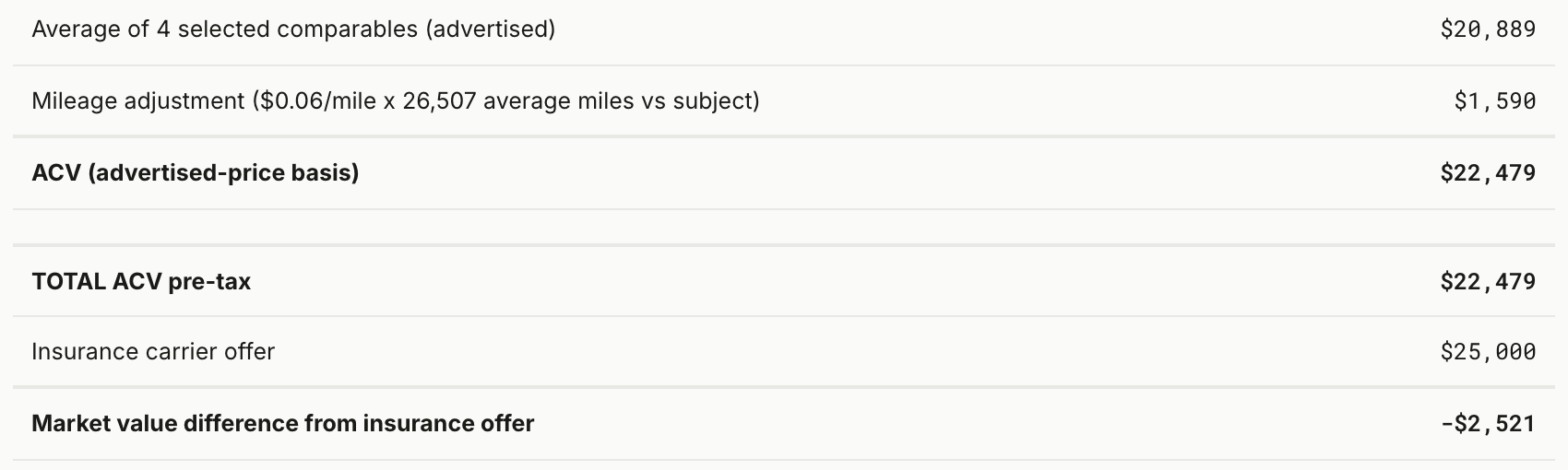
Our four selected comparables average 26,507 miles more than the subject. The page flags this in orange: the adjustment is being stretched well past the pool's mileage range. It also shows a market-implied rate, $0.07 per mile from 56 same-trim listings, with a button to use it. At $0.07 the adjustment would be $265 higher (26,507 miles x $0.01).
8. The worksheet you hand over shows only what you chose
Everything else is about getting the number right. This part is about what you send:
- Hide and sort. Hide any comparable, or all unticked ones. Sort by best match, miles, advertised price, distance or days listed.
- PDF and Excel carry only the selected comps. Working controls and the excluded list stay on your screen.
- Read-only copy. One click creates a locked version with its own link for the claimant or the carrier. It cannot be edited, and it never exposes your working page.
- ACV wording throughout. The worksheets now say "TOTAL ACV pre-tax" and "ACV minus offer", and the general worksheet is now called the ACV (Actual Cash Value) Worksheet, matching the term in the policy.
- Excel downloads finish. The download no longer waits for live dealer-page captures, which could take most of a minute.
9. Smaller things that came from the same call
- Carrier offer is editable on the page. Enter it or change it during the negotiation, and the difference line, headline and Excel follow.
- Additions and deductions remember what people type. Every label entered on a worksheet joins a shared list, so "Two tires, -400" autocompletes next time.
- Re-runs cost $0.99. Changing the miles, ZIP or radius on the same VIN and worksheet within 30 days of a full-price run costs $0.99 instead of $4.99, up to three times. Page edits (comp picks, rates, adjustments, offer) are free. A run where nothing qualifies costs $0.
- Runs finish even if the page times out. Evidence capture can take close to a minute. Before Sep 16 that sometimes showed as an error for a run that had completed. The page now waits for the result.
- Search your past files. The Activity tab filters by year, make and model and searches VIN, ZIP and every input.
- Send feedback, and comments. Every report has a "Send feedback" link for a wrong VIN decode or a comp that does not belong, and a comment thread with an internal-note option only your team sees.
What these numbers do not show
- The eight-file table is one appraiser's first files, run before the changes above. It shows where the old worksheet went wrong. It is not a measure of how often worksheets beat carrier offers.
- We do not yet know how those claims settled. A worksheet figure above the offer is an argument, not an outcome.
- The Equinox carrier offer is ours. We entered $25,000 to test the page. The comparables, prices, fees and exclusions are what the market showed on Sep 17, 2026.
- Every price is an asking price. Fee-stripped and verified, but still what the dealer advertised, not what a buyer paid.
What is still open
We are not done, and some of it depends on appraisers telling us more:
- Settlement outcomes. We want a field on the worksheet for where the claim settled, so over time you can see how your files compare with the final number.
- Carrier dealer offsets. Some carriers deduct a flat "dealer offset" (we have seen $500). We want to add it as a named adjustment with the counter-argument written out, once we have the carriers' exact wording.
- Mileage band control. The pool prefers comparables within a mileage band around the subject. If that leaves too many thin pools, the band will become a preparer setting.
Questions appraisers ask
Is this an appraisal? No. It is a worksheet built from listing evidence that a licensed appraiser or adjuster reviews, edits and certifies. The preparer's name, license and file number go in the certification block.
Why asking prices and not sale prices? Negotiated sale prices are not public. Advertised prices with fees removed, verified on the dealer's page and saved with a date, are the best evidence anyone outside the transaction can check. The worksheet labels them that way on every page.
What does it cost? The ACV Worksheet and the Total Loss Valuation Worksheet are $4.99 a file, with $0.99 re-runs as described above. There is no subscription.
Can I use it inside ChatGPT or Claude? Yes. The same worksheets run from the MarketCheck AI Desk connector, and the web form works without it.
See the worksheet from this post: the read-only 2019 Equinox Premier worksheet, including the saved dealer pages.
Run one on your next file: Total Loss Valuation Worksheet · ACV Worksheet · the Appraiser desk
If something on your file looks wrong, use the Send feedback link on the worksheet. It comes straight to the people who build it.